
Description
Hexus Go Pod Kit: Refillable, 1000mAh, Normal and Turbo Modes
The Hexus Go is a refillable pod kit that behaves a lot like a prefilled one. Its 2ml pod sits on a separate side-fill container that tops the pod up as you vape, so you fill it and forget about it for far longer than a normal pod kit – with your own choice of nic salt or 50/50 e-liquid. Inside the pod is a 0.6Ω dual mesh coil, and the 1000mAh battery charges over USB-C in about 40 minutes.
Two power modes, a small LCD battery display and inhale activation keep it simple: draw to vape, double-click the base button for Turbo. Below: full specs, the pod it uses, how to fill and set it up, battery life, troubleshooting, a comparison with a prefilled kit and the questions we get asked. For our hands-on verdict, read the Hexus Go review.
🔌 Hexus Go at a Glance
✔ 1000mAh built-in battery
✔ USB-C, roughly 40-minute charge
✔ 0.6Ω dual mesh coil in the pod
✔ Normal 16W and Turbo 20W
✔ Inhale activated
✔ LCD battery display
✔ Side-fill top-up container feeds the pod
✔ Nic salts or 50/50 e-liquid
Hexus Go Specifications
Hexus doesn’t have a brand website yet, so we cross-checked these figures across three major UK retailers (Vape Club, VapeUK and Vampire Vape) and only list what they agree on.
| Specification | Hexus Go |
|---|---|
| Battery | 1000mAh built-in |
| Charging | USB-C, about 40 minutes (no cable in the box) |
| Coil | 0.6Ω dual mesh, built into the pod |
| Power modes | Normal 16W, Turbo 20W |
| Firing | Inhale activated; power button on the base |
| Display | LCD battery display |
| Pod | 2ml refillable pod with a side-fill top-up container |
| Vaping style | Mouth-to-lung, a slightly looser draw |
| E-liquid | Nic salts or 50/50 freebase |
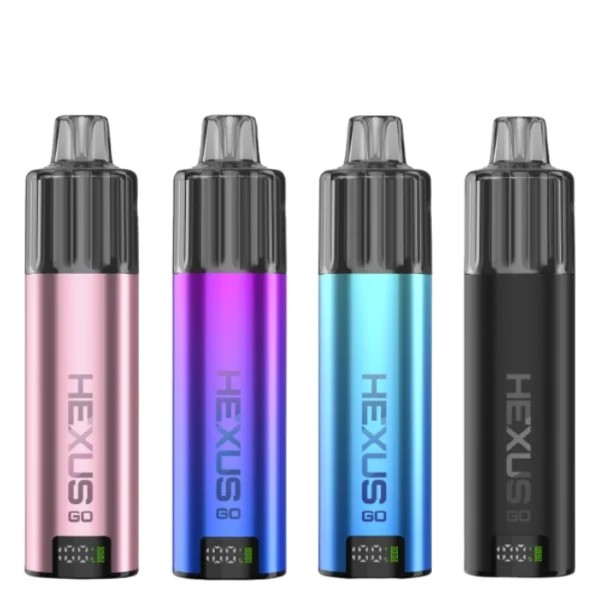
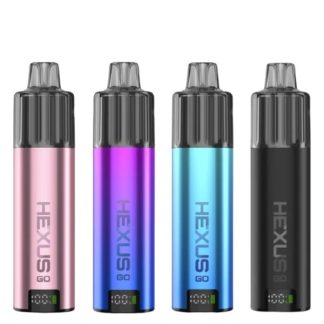
| Colours | Black, Blue Gradient, Purple Blue and Pink |
Which Pods Fit the Hexus Go?
The Hexus Go uses its own pod and top-up container, replaced together as one unit.
When the flavour fades, the part to replace is the Hexus Go replacement pod. The 0.6Ω dual mesh coil lives inside it, so a new pod means a new coil; we sell them singly, and it is worth keeping one spare in a drawer so you are never waiting on a delivery. The pod and its side-fill container come off the device together, and a fresh unit clicks straight back onto the same Hexus Go battery, which is why this kit costs so little to keep running.
Will not fit: pods from other brands’ kits – the Hexus Go pod and contacts are made for this device only.
Setting Up the Hexus Go
- Take the pod and its container out of the box and remove any stickers or silicone plugs.
- Fill the pod, then fill the container through its side port with the same e-liquid.
- Fit both to the device and leave it five minutes so the cotton around the mesh soaks through.
- Hold the button on the base until the screen lights up to switch it on.
- Draw to vape. Double-click the base button to move between Normal and Turbo; the screen shows which you’re in.
Hexus Go Battery Life and Pod Life
The 1000mAh battery gets most people through a day of steady mouth-to-lung vaping, and a USB-C charge takes around 40 minutes. Turbo at 20W draws more from the battery than Normal at 16W. The pod is the part that wears: the coil is inside it, so when the flavour goes flat or tastes toasted, replace the pod and container together. In our experience a pod gives a week or two of regular use, less with very sweet liquids.
Hexus Go Troubleshooting
| Problem | Likely cause and fix |
|---|---|
| Screen won’t light | Hold the base button until the screen comes on, or charge it – the battery may be flat. |
| Burnt first puff | The new pod wasn’t left to soak. Wait five minutes after filling next time. |
| Harsh on Turbo | Double-click back to Normal, or use a lower nicotine strength. |
| Gurgling | Liquid has flooded the coil. Take the pod off, flick it firmly into a tissue and refit it. |
| Leaking from the container | Check the side-fill plug is pushed fully closed. |
| Weak flavour after a week or two | The coil is worn. Fit a new pod and container. |
Hexus Go vs OXVA SlimStick
| Hexus Go | OXVA SlimStick | |
|---|---|---|
| What you vape | Your own nic salt or 50/50 | OXVA’s 20mg nic salt cartridges |
| Refilling | Pod plus a side-fill top-up container | None – the cartridge is sealed |
| Power | Normal 16W / Turbo 20W | Fixed |
| Battery | 1000mAh | 1500mAh |
| Screen | LCD battery display | Green or red light |
| Running cost | E-liquid plus an occasional pod | A new cartridge every time |
Want no filling at all? The OXVA SlimStick prefilled pod kit is sealed and buttonless. Want a mainstream refillable with more pod choice? The OXVA XLIM GO 2 is a good next step.
Hexus Go Colours
Four colours: Black, Blue Gradient, Purple Blue and Pink. The colour options above show which are in stock today.
What’s in the Box
One Hexus Go device, a pod with its top-up container, and a user manual. There’s no USB-C cable, so use one you already have.
Best E-Liquids for the Hexus Go
Use nic salt e-liquids at 10mg or 20mg, or a 50/50 freebase e-liquid. Sweeter liquids taste great but wear mesh coils faster; a fruit or menthol will get more life from each pod. If you’re not sure which nicotine type suits you, read nic salts vs freebase.
Try the Hexus Go in Store
Need the Hexus Go or a spare pod today? Our Totton vape shop, Hythe vape shop and Holbury vape shop stock replacement pods, coils and kits, and the team can check which resistance suits your device and e-liquid. We’ll show you how the top-up container fits and switch Turbo on for you. Stock varies by store, so give us a call before you travel. Ordering online instead? See our delivery options.
You May Also Like
- Hexus Go Replacement Pod
- Hexus Go Review
- All Hexus Vapes
- Vape Starter Kits
- Beginner’s Guide to Vaping
Frequently Asked Questions
How do you use the Hexus Go?
Fill the pod and the side-fill container, fit them, wait five minutes, hold the base button to switch on, then draw to vape.
How do you turn on Turbo mode on the Hexus Go?
Double-click the button on the base; double-click again to go back to Normal.
What wattage is the Hexus Go?
16W in Normal and 20W in Turbo.
What coil does the Hexus Go use?
A 0.6Ω dual mesh coil built into the pod – replace the pod when it wears.
How long does the Hexus Go take to charge?
About 40 minutes over USB-C. A cable isn’t included.
Can I use nic salts in the Hexus Go?
Yes – nic salts or 50/50 freebase. Avoid high-VG shortfills.
Where can I buy Hexus Go pods?
Right here – our Hexus Go replacement pods are sold singly – or in our Totton, Hythe and Holbury shops.

Reviews
There are no reviews yet.